Category: Uncategorized

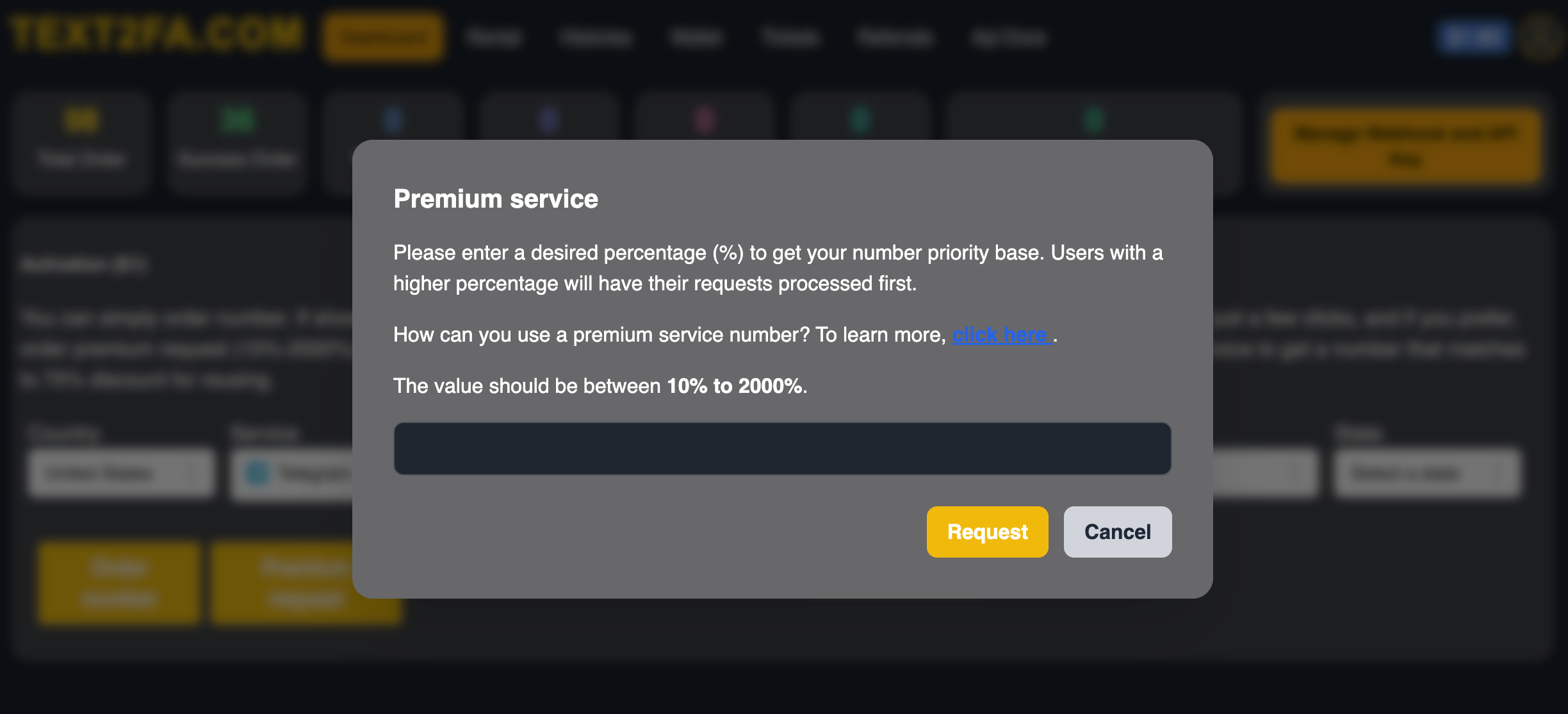
  • 🔥 How to Create a Premium Request in Text2FA When No Number Is Available

    🔥 How to Create a Premium Request in Text2FA When No Number Is Available

    Introduction

    Sometimes when you try to request a number from Text2FA, you’ll see the message “No number available” — especially for high-demand services like WhatsApp, Telegram, or Facebook. In such cases, you can still get a number instantly by creating a Premium Request.

    This guide explains what a premium request is, how it works, and how you can create one through the Text2FA API or dashboard.

    🎥 Watch the full video tutorial here:
    👉https://youtu.be/dNjMsyuTGTE


    What Is a Premium Request?

    A premium request allows you to offer a higher markup (bid) to get priority access to numbers that are temporarily unavailable.

    In simple terms, you’re telling the system:

    “I’m willing to pay a little extra to get a number faster.”

    When your request is created, the Text2FA system looks for an available number matching your service and country, and assigns it as soon as possible.


    How It Works

    1. You send a premium request with your desired service (for example, Telegram, Google, or WhatsApp).
    2. You can set a custom markup — the higher your markup, the faster your request is prioritized.
    3. Once a number becomes available, it’s automatically assigned to your account.
  • How to Integrate the Text2FA API – Complete Guide

    How to Integrate the Text2FA API – Complete Guide

    How to Implement Text2FA API (Full Integration Guide)

    Introduction

    If you’re building an app or website and need to integrate SMS-based verification — such as OTPs or temporary phone numbers — the Text2FA API provides a full suite of endpoints to help you automate this process. Their documentation outlines how to request temporary numbers, get messages, manage rentals and more. text2fa.com

    Watch in youtube: https://youtu.be/fYJnsarQMVg

    In this post, we’ll walk through:

    • What the API offers
    • How to authenticate and make requests
    • Key endpoints you’ll use for temporary and rental numbers
    • Best practices and things to watch out for

    What is Text2FA?

    Text2FA is a service offering virtual/temporary phone numbers and SMS receipt capabilities. It’s designed for scenarios where you need to receive verification codes without using a personal phone number. The API enables you to programmatically manage this via HTTP requests. (See their general service description) text2fa.com

    Authentication & Setup

    Before making API calls, you’ll need:

    • An API token provided by Text2FA
    • To include in all requests an Authorization header containing that token. text2fa.com
    • An Accept: application/json header. text2fa.com
    • For POST requests, set Content-Type: application/x-www-form-urlencoded. text2fa.com

    Key Endpoints

    Here are some of the primary API endpoints you’ll work with:

    1. Account Details

    • Endpoint: GET /api/v1/account-details
    • Purpose: Retrieves your account info and current balance. text2fa.com
    • Headers required: Authorization + Accept.

    2. Temporary Number (S1) Flow

    • Service List: GET /api/v1/services-s1 → list of available services for S1. text2fa.com
    • US States (if you need US-state scoped numbers): GET /api/v1/us-states text2fa.com
    • Request Number:POST /api/v1/request-number-s1
      • Params: service_key, state (optional), request_premium (if you want to bid premium) text2fa.com
    • Reuse Number: POST /api/v1/reuse-number-s1 → reuse a number you previously ordered. text2fa.com
    • Reject Number: POST /api/v1/reject-number-s1 → release a number you don’t need. text2fa.com
    • Number Details: GET /api/v1/number-details-s1?order_id=<id> → get info about specific order. text2fa.com
    • Reserved List: GET /api/v1/reserved-list-s1 → see reserved S1 numbers under your account. text2fa.com

    3. Temporary Number (S2) Flow

    • Similar to S1 but a different category.
    • Service List: GET /api/v1/services-s2 text2fa.com
    • Request Number: POST /api/v1/request-number-s2 (with service_key) text2fa.com
    • Reject Number, Number Details, Reserved List all follow similar patterns. text2fa.com

    4. Rental Numbers

    • Service List: GET /api/v1/rental-service-list text2fa.com
    • States/Countries: GET /api/v1/rental-states text2fa.com
    • Request Rental Number:POST /api/v1/request-rental-number
    • Reserved List: GET /api/v1/rental-reserve-list text2fa.com
    • Get Message: GET /api/v1/rental-message?order_id=<id> → retrieve SMS for that number. text2fa.com
    • Active Rentals: GET /api/v1/active-rental-numbers text2fa.com
    • Renew Rental: POST /api/v1/renew-rental (params: order_id, additional_days) text2fa.com
    • Cancel Rental: POST /api/v1/cancel-rental (param: order_id) text2fa.com

    Embedding the Video

    You can embed the tutorial video (above) into your WordPress post using the standard YouTube embed approach. Here’s how:

    1. Copy the YouTube link: https://youtu.be/fYJnsarQMVg
    2. In your WordPress editor, either paste it directly (Gutenberg auto-embed) or use the “YouTube” block.
    3. Place it suitably early in the post so readers can watch the walkthrough while reading.

    Best Practices

    • Use the right service key: Make sure you select the correct service (S1, S2 or Rental) depending on your use case.
    • Manage premium requests: If regular numbers are unavailable, you can set request_premium to bid higher for priority access.
    • Poll for messages: For temporary numbers, many workflows require checking the number details then waiting/polling for an SMS code.
    • Set up webhooks: The documentation mentions you can configure a webhook URL for real-time events (number assignment, SMS reception, rental updates). text2fa.com
    • Handle rejections & cleanups: If you no longer need a number, it’s good practice to release it (Reject endpoint) so you don’t waste resources.
    • Monitor your balance: Since usage costs money, keep an eye on your account balance and usage to avoid unexpectedly running out.
  • 10 Best Reasons to Use Text2FA.com for Secure & Reliable OTP Verification

    10 Best Reasons to Use Text2FA.com for Secure & Reliable OTP Verification

    In today’s digital world, online security is no longer optional—it’s essential. Whether you’re running an e-commerce store, building a SaaS platform, or managing a financial service, protecting your users with secure two-factor authentication (2FA) can make the difference between trust and vulnerability.

    That’s where Text2FA.com comes in. It’s not just another SMS verification service—it’s a powerful, global, and developer-friendly platform designed to make OTP verification simple, fast, and affordable.

    Here are the 10 best reasons to use Text2FA.com for your business.


    1. Global Coverage Across 100+ Countries

    Text2FA.com provides instant access to worldwide SMS verification numbers, making it easy to authenticate users no matter where they’re located. From the U.S. to Asia, Europe, and beyond—you’re covered.


    2. Affordable Pricing with No Hidden Fees

    We believe in transparency. Text2FA.com offers competitive pay-as-you-go pricing, ensuring you only pay for what you use. No contracts. No hidden charges. Just simple, scalable OTP verification.


    3. Real-Time OTP Delivery

    Speed matters. Our platform ensures lightning-fast OTP delivery so your users never experience delays when signing up, logging in, or completing a secure transaction.


    4. Bulk SMS Verification for Any Scale

    Whether you need to verify 10 users or 10 million, Text2FA.com scales with your business. Our robust infrastructure handles bulk requests seamlessly without delays or downtime.


    5. Developer-Friendly API Integration

    We make it easy for developers. Text2FA.com provides a simple REST API with clear documentation, allowing you to integrate OTP verification into your website, app, or platform within minutes.


    6. Advanced Anti-Fraud Protection

    Fraudulent sign-ups and fake accounts hurt businesses. Text2FA.com uses AI-powered filtering and real-number validation to minimize risk and keep your platform safe from abuse.


    7. Multi-Platform Use Cases

    From banking apps, e-commerce stores, crypto exchanges, ride-sharing platforms, and SaaS loginsText2FA.com works across industries. Wherever secure authentication is needed, we’ve got you covered.


    8. Reliable Uptime & Performance

    Downtime means lost users. That’s why Text2FA.com guarantees 99.9% uptime, backed by strong server infrastructure and global routing for maximum reliability.


    9. Flexible Dashboard & Analytics

    Our intuitive dashboard gives you real-time insights into your SMS usage, delivery rates, and performance. Monitor your OTP verification campaigns and optimize them with ease.


    10. 24/7 Customer Support

    Your business doesn’t stop, and neither do we. Text2FA.com offers round-the-clock support to ensure you always have help when you need it.


    Final Thoughts

    If you’re looking for a secure, scalable, and cost-effective OTP verification service, Text2FA.com is the answer. With global reach, real-time delivery, advanced anti-fraud protection, and developer-friendly integration, we make user authentication simple and reliable.

    👉 Get started today with Text2FA.com and protect your users the smart way.
  • Create Google voice with Temporary US Phone Numbers

    Create Google voice with Temporary US Phone Numbers

    Google Voice is a free VoIP service by Google that lets you call, text, and receive voicemails using a US-based phone number. But setting it up requires verifying your identity with a US phone number. If you’re outside the US or don’t want to use your personal number, a temporary US number is a smart, affordable solution.

    In this blog, we’ll show you how to create a Google Voice account using a temporary US phone number from Text2FA — starting at just $0.6 per number.

    🔍 Why Use a Temporary US Number?

    • ✅ Maintain privacy by not using your personal number
    • ✅ Get a fresh number for quick verifications
    • ✅ Avoid regional restrictions if you’re outside the US
    • ✅ Easily disposable after use

    🔍 Platform Comparison: Best Temporary Numbers for Google Voice

    PlatformStarting PriceGoogle SupportDelivery SpeedReliabilityNotes
    Text2FA$0.6✅ Yes⚡ Instant⭐⭐⭐⭐ HighBest value, fresh number pool
    TextNowFree❌ Blocked⚠ Unstable⭐⭐ Low–MediumOften banned by Google
    TextVerified.com$1.80 – $2.50✅ Yes⚡ Fast⭐⭐⭐⭐ HighTrusted but expensive
    5SIM.net$0.8 – $1.2⚠ Sometimes⚡ Fast⭐⭐ MediumHit-or-miss for Google Voice
    SMS-Activate.ru$0.75 – $1.5⚠ Sometimes🕓 Slower⭐⭐ MediumGood pool but complex UI
    Receive-SMS-OnlineFree❌ Blocked❌ Unreliable⭐ Very LowNumbers are public & overused

    💡 What You Need

    • A Gmail (Google) account
    • A US IP address (use a VPN like NordVPN or ProtonVPN)
    • A temporary US phone number from Text2FA

    🛠️ Step-by-Step: Creating Google Voice with a Temporary Number

    1. Buy a Temporary US Number

    Go to Text2FA.com, select Google as the service, and purchase a US number. Prices start at $0.6, depending on availability.

    💡 Tip: Make sure you stay logged into Text2FA to receive the SMS verification code.


    2. Connect to a US VPN Server

    Since Google Voice is only available in the US, you’ll need to:

    • Use a reliable VPN
    • Connect to a US-based server

    3. Sign Up for Google Voice

    • Go to voice.google.com
    • Log in with your Gmail account
    • Choose a US area code and pick your desired number

    4. Verify with the Temporary Number

    • When prompted, enter the temporary US number you got from Text2FA
    • Google will send a 6-digit verification code to the number
    • Copy the code from Text2FA and enter it into Google Voice

    🎉 Done! You’ve now successfully activated Google Voice using a temporary US number.


    🧠 Frequently Asked Questions

    ❓ Can I reuse the temporary number?

    No. Most temporary numbers are single-use and will expire after the verification is done.

    ❓ Will Google ban temporary numbers?

    Google may block certain numbers if they’ve been overused. That’s why Text2FA frequently refreshes their number pool to maintain reliability.


    🔐 Final Thoughts

    Setting up a Google Voice number is easy and secure using Text2FA.com. At only $0.6, it’s a small price to pay for privacy, flexibility, and convenience.

  • Earn a 5% Affiliate Bonus with Text2FA

    Earn a 5% Affiliate Bonus with Text2FA

    Earn a 5% Affiliate Bonus with Text2FA

    Refer friends, colleagues, or clients to Text2FA and get rewarded for every dollar they spend. Here’s how it works:

    1. Sign Up as an Affiliate
      Create a free Text2FA affiliate account via our Affiliate Portal. You’ll receive a unique referral link and tracking dashboard.
    2. Share Your Link
      Promote Text2FA on your website, blog, social media, or email newsletter. Whenever someone clicks your link and funds their Text2FA balance, you earn a bonus.
    3. Earn 5% on Every Purchase
      For each top-up your referral makes, we’ll credit your affiliate account with 5% of their spend—automatically and in real time.
    4. Quick Payouts
      Once your accrued bonus reaches $50, you can request payout via PayPal or bank transfer. No hidden fees, no hoops to jump through.

    Why Join Our Affiliate Program?

    • Competitive Commission: 5% on all SMS credits purchased.
    • Transparent Tracking: Monitor clicks, sign-ups, and earnings in your dashboard.
    • Marketing Assets Provided: Get banners, email templates, and social posts designed to convert.
    • Dedicated Support: Our affiliate manager is standing by to help you optimize performance.

    Ready to start earning? Sign up now and turn every referral into passive income with Text2FA’s 5% affiliate bonus!

  • Get Started with Text2FA: Enjoy a $0.15 Instant Registration Bonus Today!

    Get Started with Text2FA: Enjoy a $0.15 Instant Registration Bonus Today!

    Get Started with Text2FA: Enjoy a $0.15 Instant Registration Bonus Today!

    Signing up for a reliable SMS verification service has never been more rewarding. At Text2FA, we’re committed to helping you bypass verification barriers with bulk, non-VoIP phone numbers—and now, we’re sweetening the deal with a $0.15 instant bonus credited to your account the moment you register.


    Why Choose Text2FA?

    • Non-VoIP, Real Phone Numbers: Our numbers look and act like ordinary mobile lines, ensuring maximum compatibility with the widest range of services.
    • Scalable Plans: Whether you need a single number for occasional use or a fleet of numbers for large-scale campaigns, our pricing plans are flexible and pay-as-you-go.
    • API & Webhook Support: Integrate seamlessly with your workflows—send and receive SMS through our RESTful API, complete with webhook callbacks for instant updates.
    • Global Coverage: Access numbers in multiple countries, so you can verify users wherever they are.

    How to Claim Your $0.15 Bonus

    1. Register an Account
      Head over to our registration page and complete the simple sign-up form.
    2. Bonus Credited Instantly
      As soon as your account is verified, we automatically add $0.15 to your balance.
    3. Start Sending SMS
      Visit your dashboard to purchase numbers or trigger SMS messages via our API—your bonus is ready to use immediately.

    Make Your Verification Process Hassle-Free

    With your $0.15 instant bonus, you can test our service risk-free or top up your balance for actual campaigns. Wondering how much you’ll spend? Check our detailed pricing page to see rates per country and volume discounts.


    Need Help or Have Questions?

    Our support team is here to assist you every step of the way. Whether you need guidance on integrating our API or want to learn more about webhook configurations, just drop us a line on our contact page and we’ll get back to you promptly.


    Don’t miss out on this limited-time offer—sign up now, get your $0.15 bonus, and start verifying users in seconds!